From setup to first submission
Six sample shots, a desktop visualizer, and four reference baselines. Newcomers without fusion expertise can reach a working submission in well under an hour.
Four steps
1 · Install
~2 minpandas, pyarrow, and plotly. That’s enough to load and plot
a shot.
2 · Explore
Visual3 · Model
Baselines4 · Submit
Codabench.npz per machine and submit to the public leaderboard.
Quickstart
Each Parquet file holds a single shot. The target efit_psirz is a list of 65×65 flux maps —
one per efit_times slice. The two golden rules: resample inputs onto EFIT times,
and never interpolate the targets.
The starter kit's experiments.py (scikit-learn) and experiments_torch.py
(PyTorch) reproduce the baselines end-to-end, and submission_skeleton.py plus
validate_submission.py get you from a trained model to a validated submission.
import pandas as pd
import numpy as np

# One row per shot; every series/profile is a nested array in that row.
df = pd.read_parquet("d3d_shot_203702.parquet")

# Target: a sequence of 65x65 poloidal flux maps, one per EFIT time slice.
psirz  = df["efit_psirz"].iloc[0]     # list of 2D grids
efit_t = np.array(df["efit_times"].iloc[0])   # ms — diverted frames only,
                                              # so NOT evenly spaced

# Input example: an F-coil current (kA-turn) on the shared magnetics clock.
f1a   = np.array(df["magnetics_F1A"].iloc[0])
mag_t = np.array(df["magnetics_time"].iloc[0])

# Resample INPUTS onto EFIT times — never interpolate the targets.
f1a_on_efit = np.interp(efit_t, mag_t, f1a)The dFL visualizer
dFL (Data Fusion Labeler) is a cross-platform desktop app for inspecting multi-rate
scientific data. Point it at the challenge’s fusion_data_provider.py plugin and it auto-discovers
the sample shots, then renders flux contours, Thomson heatmaps, coil currents, and the X-point gap
interactively — no fusion background required.
Binaries for Apple Silicon, Windows, and Linux are available from the dFL download page.
Four baselines, simplest to deepest
All implemented in scikit-learn and PyTorch and released as runnable scripts in the starter kit. Every one trains in under two hours on a single commodity GPU or CPU.
PCA + Ridge
<0.1 sPCA + Random Forest
InterpretableMLP on PCA targets
MSE 0.005Convolutional decoder
~5M params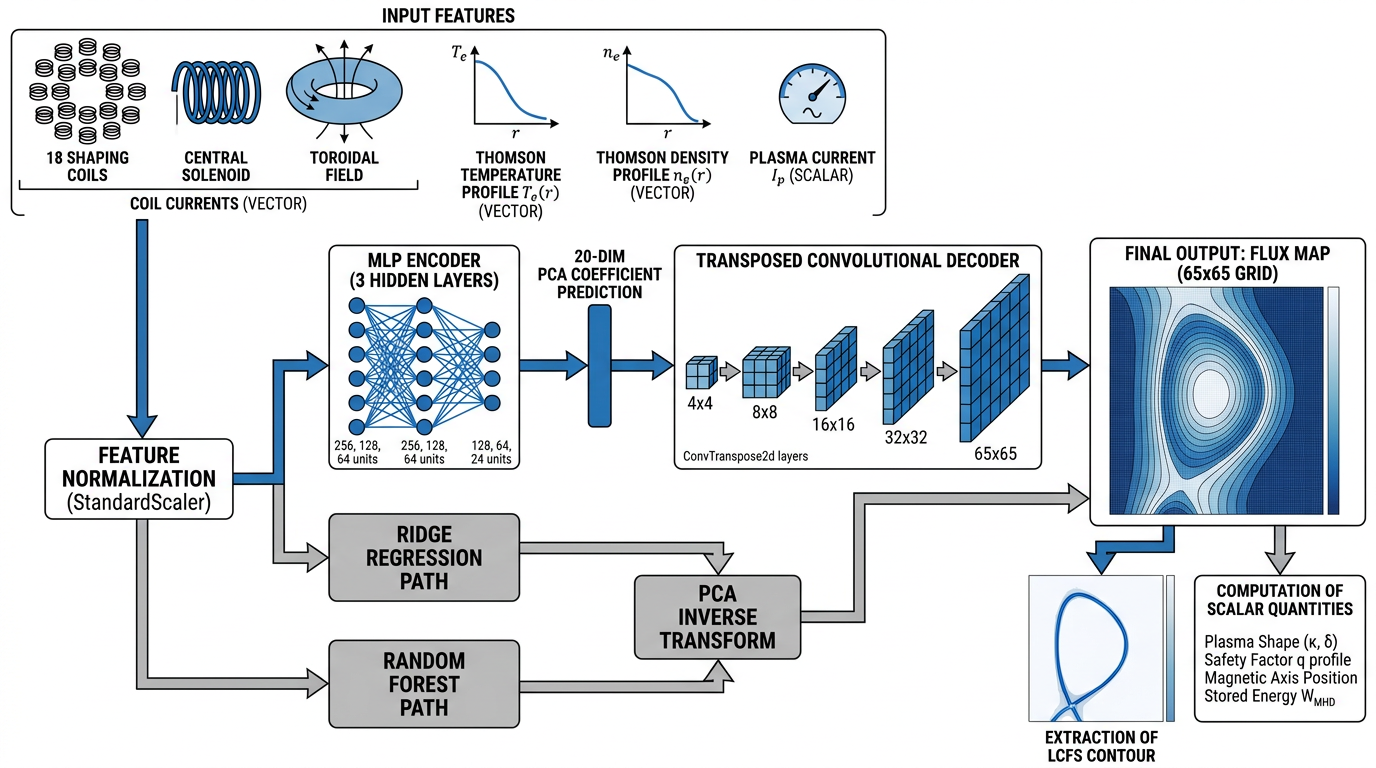
Submission format
Package your predictions (flux maps plus q95 and betaN) as
.npz files indexed by shot and EFIT timestamp, plus a small
manifest.json. You do not submit anything else — the LCFS contour, magnetic axis,
shape, volume and li are all derived from your flux map by the scorer.
Submit through Codabench, which scores against the hidden test set and updates the leaderboard
automatically.
A small manifest.json travels with your predictions, but the scorer finds them by
filename — keep the two .npz named exactly as the config names.
Submissions are capped at 5 per day and 100 total per team to discourage leaderboard probing. See Rules & Evaluation for the full scoring breakdown.